How to Use AI in 2026: Go Beyond ChatGPT
5-second Summary
AI isn't just ChatGPT. Here's a practical, no-fluff guide to actually using AI tools across your work — from research and coding to automation and image generation.
When most people say "I use AI," what they really mean is: "I type stuff into ChatGPT sometimes."
That's not using AI. That's barely scratching the surface.
In 2026, AI is an entire ecosystem of 100+ tools — each built for different jobs, different workflows, and different types of thinking. ChatGPT is one of them. A great one. But treating it as "AI" is like calling Google the entire internet.
This guide is different from the generic "here's how to write a prompt" articles. This is a practical, tool-by-tool breakdown of how to actually integrate AI into your daily life — starting today.
Step 1: Stop Thinking of AI as One Thing
The biggest mistake beginners make is treating AI as a single product. It's not.
AI in 2026 is a category of tools, each with a specialty:
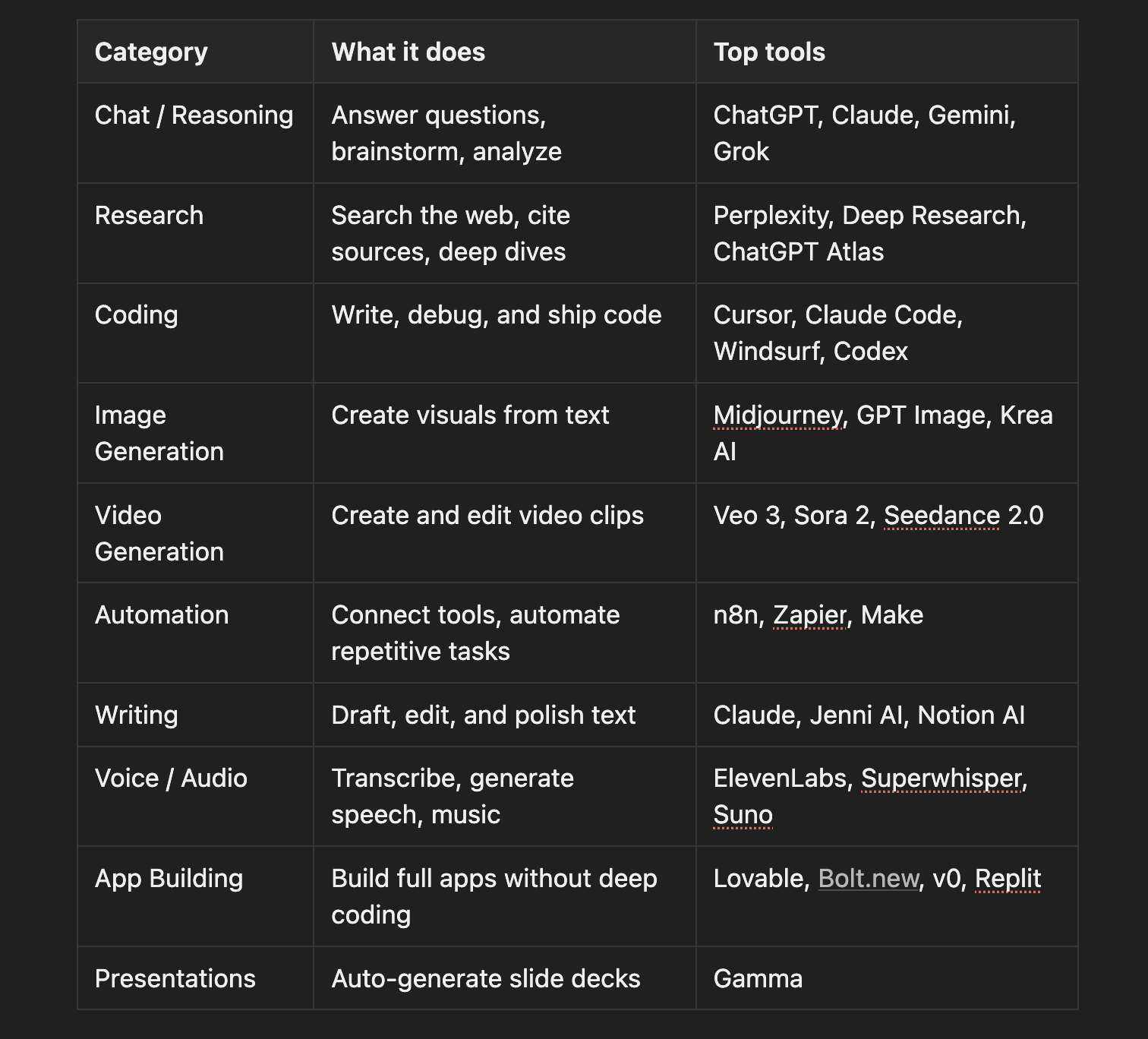
The point isn't to learn all of them. It's to know they exist so you can reach for the right one when you need it.
Step 2: Pick Your First 3 Tools
You don't need 20 AI tools. You need 3 that match how you work.
Here's how to pick:
Ask yourself: What do I spend the most time on?
Writing emails, docs, or content? → Start with Claude (nuanced, long-form) or ChatGPT (fast, versatile)
Researching topics or competitors? → Start with Perplexity (cited sources, real-time search)
Building or fixing code? → Start with Cursor or Claude Code (AI-native coding)
Creating visuals? → Start with Midjourney or GPT Image (text-to-image)
Managing repetitive tasks? → Start with n8n or Zapier (connect everything)

Once you've picked 3, commit to using them every day for one week. Not for fun experiments — for real work. That's when AI clicks.
Step 3: Learn to Prompt Like a Pro (In 10 Minutes)
You don't need a course on prompting, but 3 techniques that cover 90% of use cases:
Technique 1: Give Context First
Bad: "Write me an email."
Good: "I'm a startup founder. I need to email a potential investor who I met at a conference last week. The tone should be professional but warm. Keep it under 150 words."
The more context you give, the less generic the output.
Technique 2: Two-Step Prompting
Instead of asking for the final result directly:
First prompt: "I need to write a blog post about remote work productivity. Before writing, outline the 5 most compelling angles and tell me which one has the most SEO potential."
Second prompt: "Great, write the post using angle #3. Use a conversational tone, include examples, and keep it under 1,500 words."
This gives the AI time to think — and gives you a chance to steer before it writes.
Technique 3: Use Examples
"Here's an example of the tone I want: [paste example]. Now write something similar for [your topic]."
Examples are the fastest way to get the output to match your voice.
Step 4: Build Your First AI Workflow
Using AI for isolated tasks is level 1. Workflows are level 2 — and they're where the real time savings happen.
A workflow is just: multiple AI tools chained together to complete a full job.

Here are 3 workflows you can set up today:
Workflow 1: Content Research → Draft
Perplexity → Research a topic, get sourced facts and stats
Claude → Paste the research, ask it to write a structured draft
ChatGPT → Polish the draft, generate a headline and meta description
Workflow 2: Meeting → Action Items
Granola or Fireflies.ai → Auto-transcribe your meeting
Claude → Paste transcript, extract key decisions and action items
Notion AI → Create tasks from the action items
Workflow 3: Idea → Landing Page
ChatGPT → Brainstorm copy and value propositions
GPT Image or Midjourney → Generate hero images
Lovable or v0 → Build the page with AI assistance
The key is: don't use one tool for everything. Chain the right tools together and you'll move 5–10x faster.
Step 5: Stay Current Without Losing Your Mind
A new AI tool launches every day. You can't track them all — and you shouldn't try.
Here's how to stay current without burning out:
The 5-Minute Daily Routine
Check one curated source — a daily AI newsletter or app that filters the noise for you
Ask yourself: does this affect my workflow? — if not, skip it
Try one new tool per week — not per day. Give it a real shot before moving on
How to Evaluate a New Tool in 5 Minutes
What category is it? (Research? Coding? Image?)
Does it do something my current tools don't?
Is it better than what I already use in that category?
What do other users rate it?
If you can't answer "yes" to at least two of those, skip it and move on.
Step 6: Go Beyond the Basics
Once you've got your 3 tools and your first workflow, here's where to level up:
Learn AI Skills, Not Just Tools
Tools change every month. Skills compound forever:
Prompt engineering — the art of getting great outputs from any model
Workflow design — chaining tools to automate multi-step processes
Tool evaluation — quickly assessing whether a new tool is worth your time
AI-assisted decision making — using AI to analyze options, not just execute tasks
Take on Challenges
The fastest way to learn AI isn't reading about it. It's doing things you haven't done before:
Build a simple app using Lovable or Bolt.new
Create a full research report with Perplexity's Deep Research
Generate and edit a video with Veo 3
Automate your entire email triage with n8n + Claude
Each challenge forces you to learn new tools and techniques. That's how you compound.
Step 7: Track Your Progress

What gets measured gets improved. The people who are actually getting ahead with AI aren't just using it — they're tracking what they use, what works, and where they're improving.
Keep a simple log:
Which tools did I use today?
What did I use them for?
Did I learn anything new?
What should I try next?
This takes 2 minutes and completely changes how fast you improve.
The Hardest Part Is Starting. The Second Hardest Part Is Having a System.
Most people who "try AI" don't fail because the tools are bad. They fail because they don't have a structure — no plan, no progression, no way to know what to learn next.
They try ChatGPT, get a decent result, don't know where to go from there, and slowly stop using it.
That's exactly the problem Disparity solves.
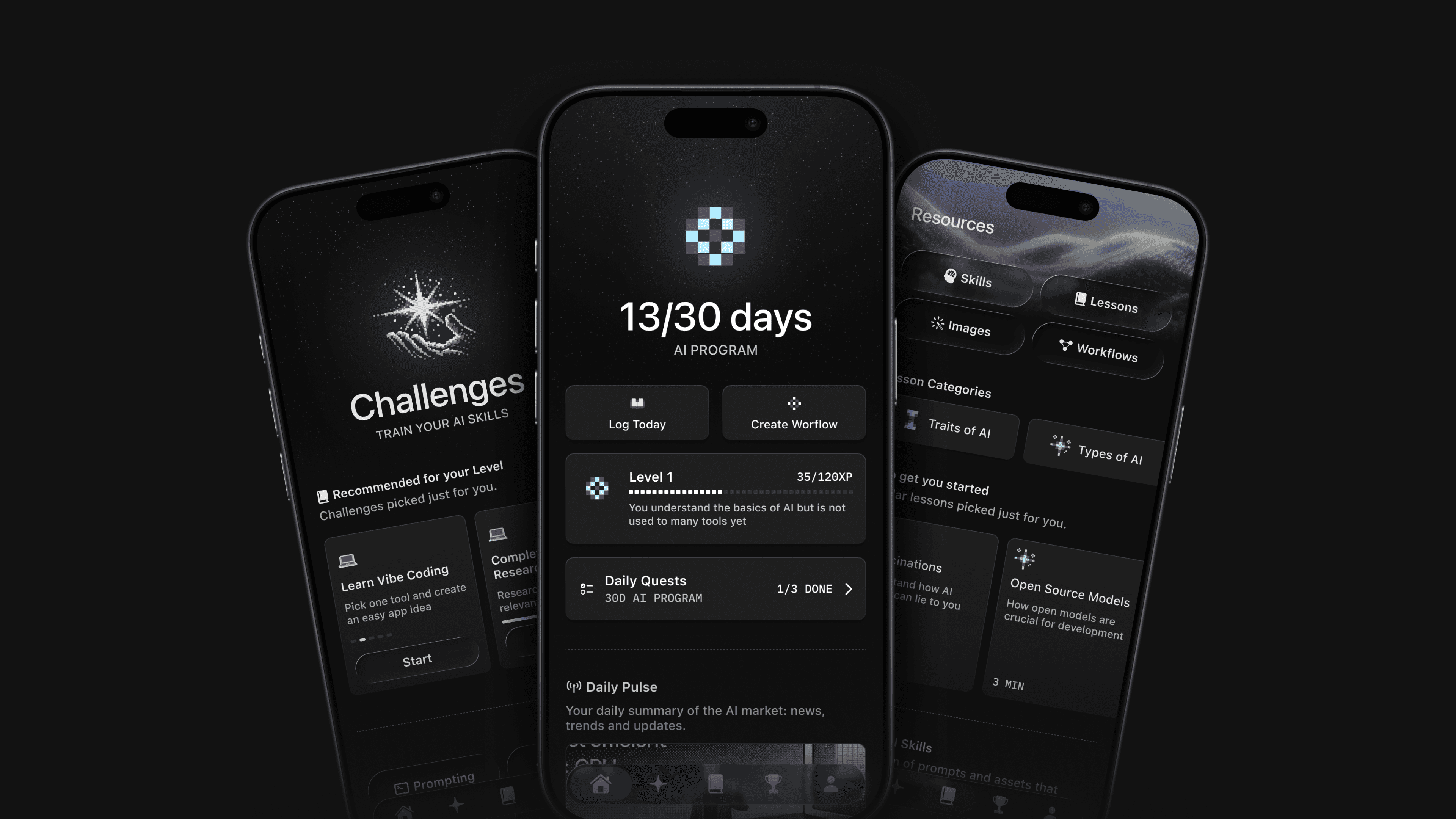
Disparity has a catalogue of 100+ AI tools — rated, categorized, and matched to your skill level. It diagnoses where you are, builds a personalized 30-day challenge with daily tasks, tracks your streak, teaches you the right skills in order, and keeps your tool stack up to date — so you stop guessing and start compounding.
Download the app today to be an AI Master.
Published on
Pedro Schott
Writer at Disparity